Introducing the New Magfi Ads: One AI Agent for Telegram and Discord Community Ads
October 21, 2026
Communities are where people spend real attention. They joined those Telegram channels, groups and Discord servers on purpose, and they read what is posted there. The hard part of community advertising was everything around the post: finding the right communities, setting budgets, writing the ad and collecting results by hand.
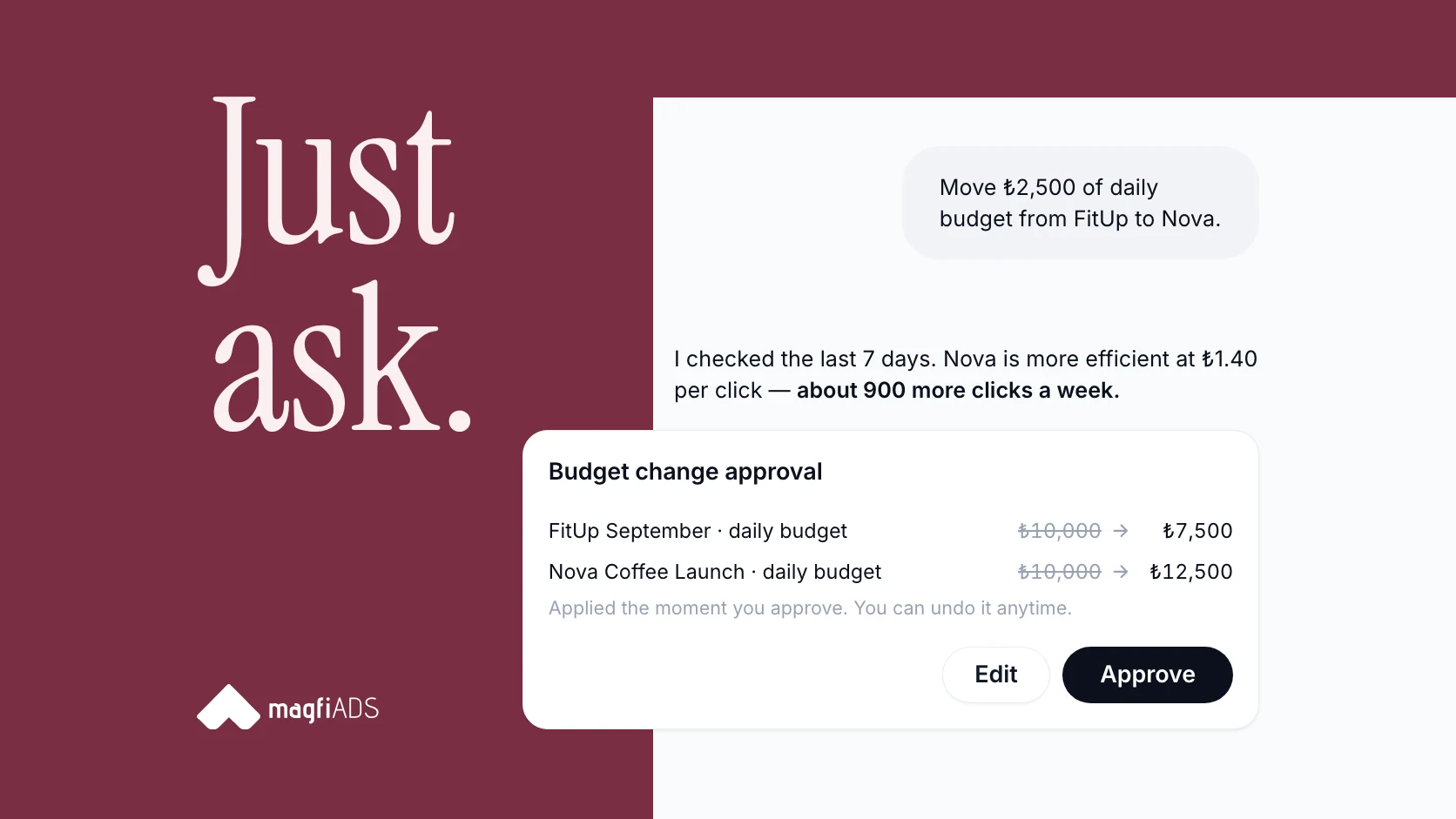
We rebuilt Magfi Ads from the ground up to take that work off your plate. The new dashboard is live now at business.magfiads.com. At its center is an AI agent that runs your campaigns through a simple conversation. Our goal fits in two words: just ask.
This article walks through every new feature, from the AI agent to reports. If you are new to the channel, start with our guide on how to advertise on Telegram in 2026.
- 16,000+Telegram and Discord communities
- 5+countries
- 13M+daily views
- 5,000+advertisers
What's new in Magfi Ads at a glance
| Feature | What you can do |
|---|---|
| AI agent | Launch campaigns, move budgets, edit audiences, improve ad copy and build reports by chatting. Every change waits for your approval. |
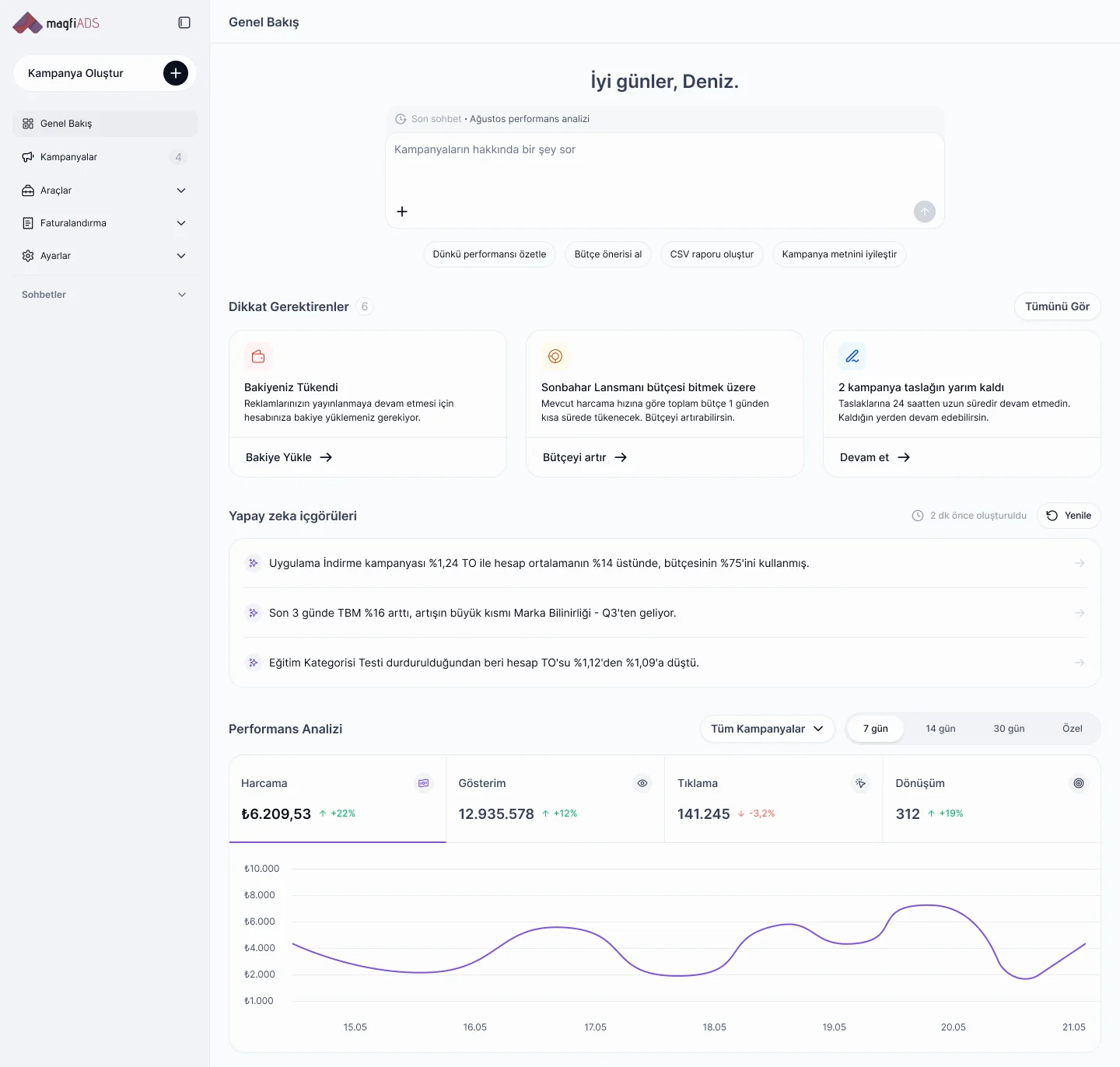
| Overview | See tasks, AI insights, performance, balance and conversions on one screen. |
| Audience Manager | Describe your audience in plain words and get matching communities in seconds. Saved audiences can update themselves. |
| Campaign builder | Launch in three steps with a live forecast, a live ad preview and AI ad variations. |
| Brand safety | Use frequency caps, community and keyword exclusions and brand safety filters in every ad group. |
| Conversions | Measure website, app and Telegram community actions from one setup flow. |
| Reports | Get daily reports automatically, build custom reports by chatting and share them with a link. |
| Campaigns | Pause or start campaigns in one click and get AI suggestions for any campaign. |
Meet the AI agent: run your Telegram ads by chatting
The AI agent is the biggest change in the new Magfi Ads. You will find it at the top of the Overview, and your chats are always one click away in the left menu. Write what you need the way you would brief a colleague, and the agent does the work inside your account.
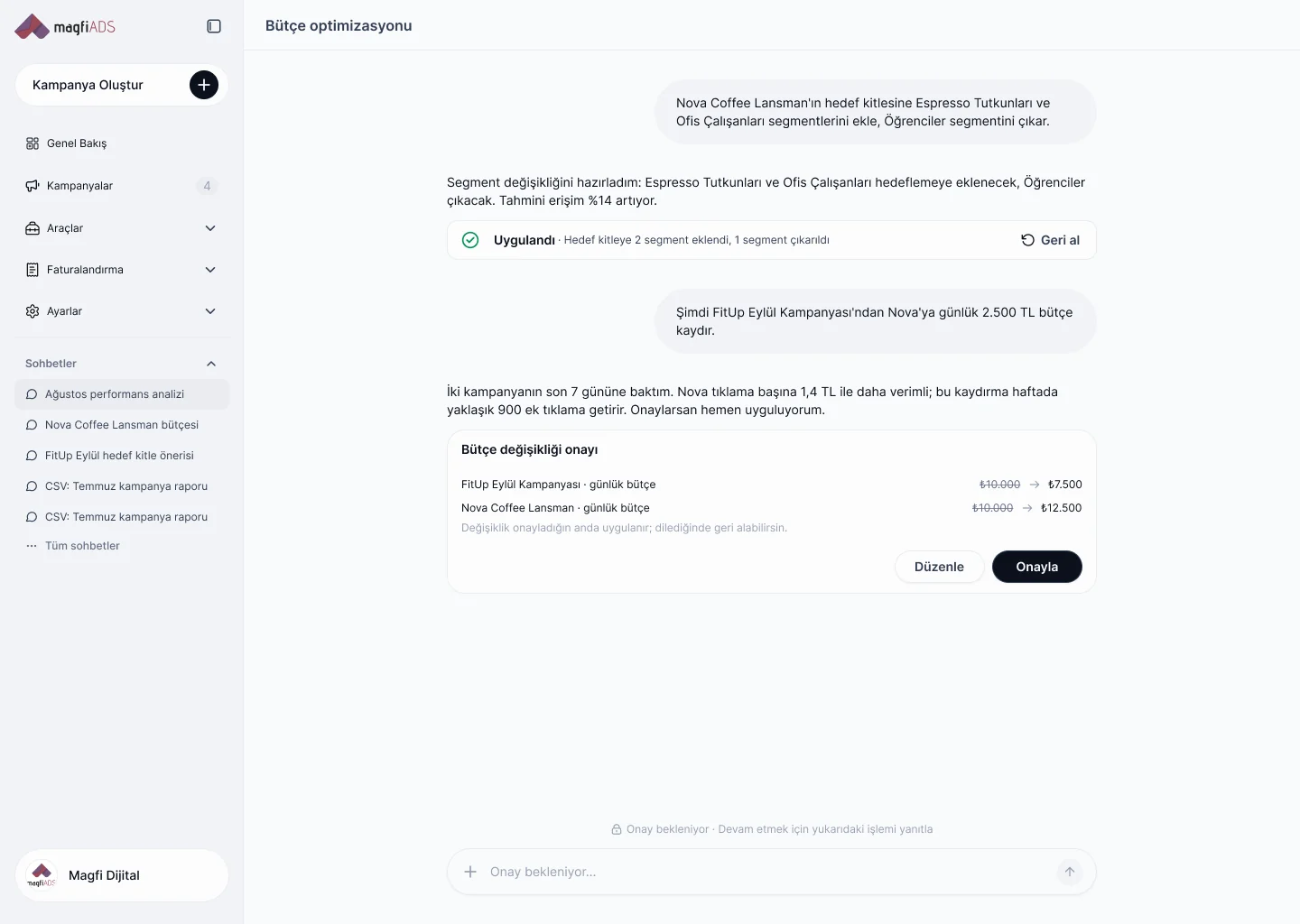
Here is an example from the new dashboard. An advertiser asks the agent to add two new segments to a coffee brand's launch audience and remove one. The agent prepares the change, notes that estimated reach goes up by 14% and applies it once approved. Next, the advertiser asks it to move ₺2,500 of daily budget from one campaign to another. Before doing anything, the agent checks the last seven days of both campaigns. It explains that the receiving campaign is more efficient at ₺1.40 per click, estimates about 900 extra clicks per week and waits for approval.
What you can ask the agent
- "Summarize yesterday's performance."
- "How did my campaigns perform in August? Export it as CSV."
- "Move budget to my best performing campaign."
- "Add office workers to this audience and remove students."
- "Make this ad text shorter and clearer."
- "Create a reach campaign for tech enthusiasts in Türkiye."
You stay in control
The agent does not change your account on its own. Every action that would change a campaign comes as an approval card with the old and new values side by side. You can approve it, edit it or leave it. If you change your mind later, you can undo it with one click.
Every conversation is saved under Chats in the left menu, so you can return to an analysis or a report whenever you need it.
A new Overview built around what needs your attention
The Overview is the first screen you see after logging in. It is designed to answer one question fast: what should I do next?
- Ask bar and shortcuts: ask the agent anything, or start with one tap: summarize yesterday's performance, get a budget suggestion, create a CSV report or improve your campaign copy.
- Needs attention: cards for anything that needs action, such as an empty balance, a budget about to run out or an unfinished campaign draft. Each card comes with a one-click fix.
- AI insights: short findings written for your account, for example a campaign whose CTR is 14% above your account average.
- Performance analysis: spend, impressions, clicks and conversions for the last 7, 14 or 30 days, across all campaigns or for one.
- Balance: your balance and how many days it will last at your current daily spend.
- Conversions and timing: your top converting campaigns and a day-and-hour heatmap of your results.
- Campaigns table: status, spend against budget, impressions, clicks, conversions, CPM, CPC, CPA and CTR for every campaign.
Audience Manager: describe your audience, we find the communities
On most ad platforms, targeting means picking categories one by one. In the new Audience Manager, you describe the people you want to reach in your own words, for example "tech enthusiasts who try new tools early." Choose a country and a language, add anything you want to leave out, such as crypto communities, and Magfi matches your description to communities. It usually takes 5 to 10 seconds, and it is the fastest way to reach niche Telegram communities that are hard to find by hand.
Before you save, you see the shape of the audience: how many communities match, whether the audience is narrow, balanced or broad, a short written summary, estimated reach, average CPM, the mix of channels and groups and an interest breakdown.
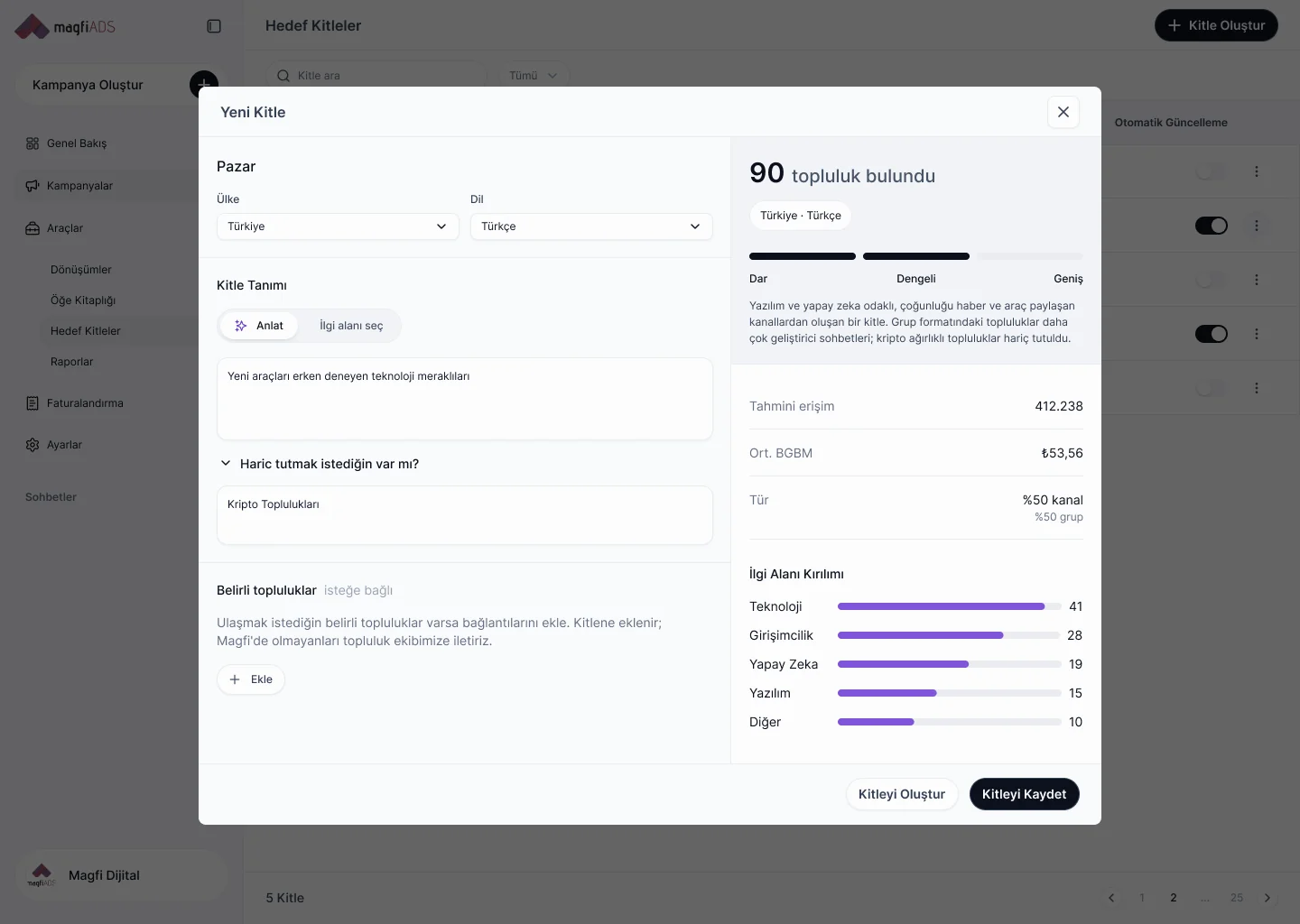
Prefer to choose yourself? Switch to interest mode and pick categories and subcategories. If you already know communities you want to appear in, add their links. Communities that are not on Magfi yet are passed to our community team.
Saved audiences can also update themselves. Turn on automatic updates, and new communities that match your description are added to the audience as they join Magfi.
Create a Telegram ad campaign in three steps
The new campaign builder follows a clear structure: a campaign holds ad groups, and each ad group holds ads. A live forecast and an AI helper stay next to you at every step.
Step 1. Campaign: choose your brand and objective
Name your campaign, pick the brand and choose one of four objectives:
- Reach: reach audiences no one else can reach.
- Traffic: bring visitors from communities to your website.
- App installs: get your app downloaded and win new users.
- Community promotion: grow your own channel with new members.
If you track conversions, you also choose the conversion event the campaign reports on.
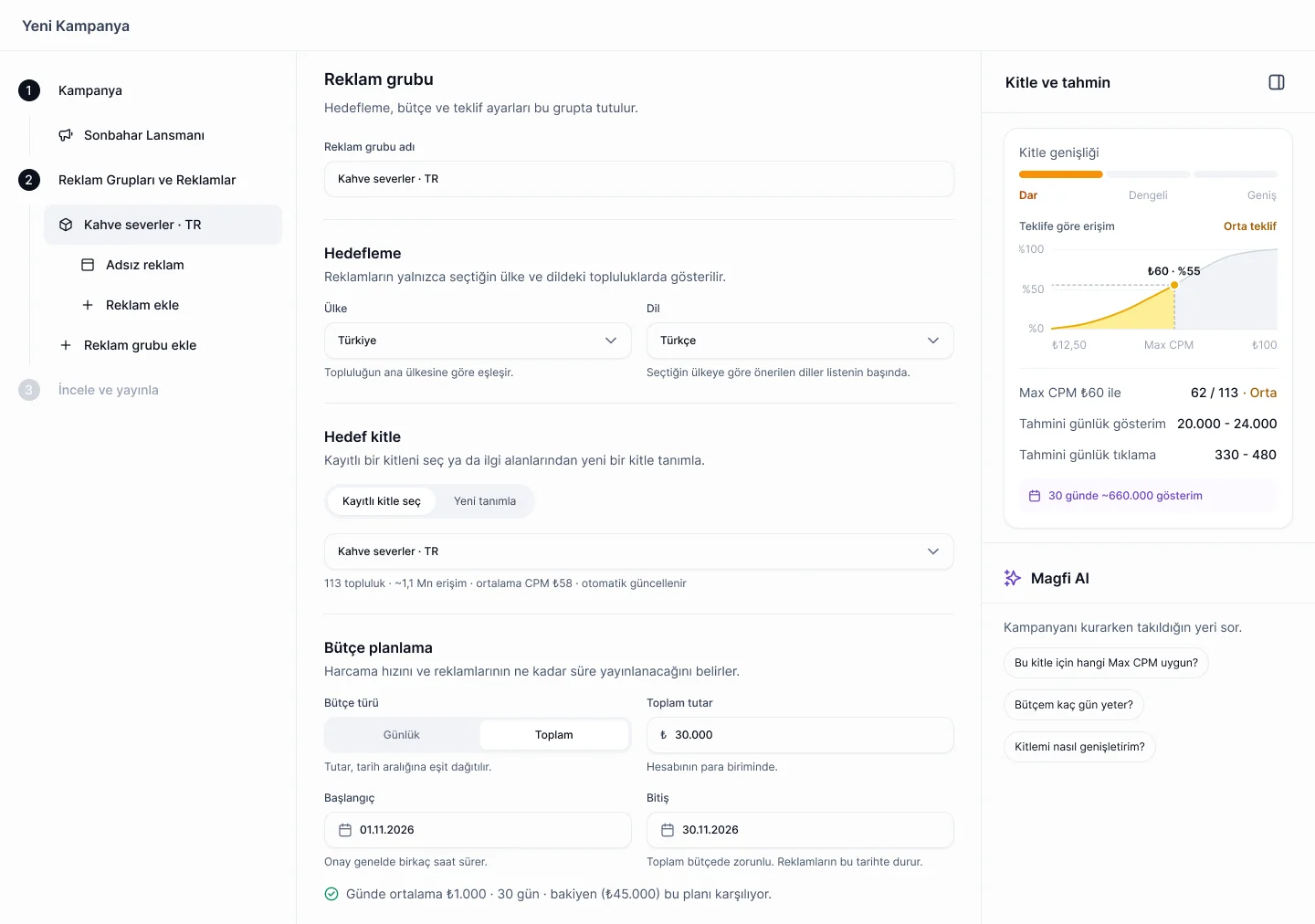
Step 2. Ad group: targeting, budget, schedule and bid
- Targeting: choose a country, a language and an audience. Use a saved audience or define a new one on the spot.
- Budget: daily or total, with start and end dates. The builder checks whether your balance covers the plan.
- Ad scheduling: run ads only on the days and hours you choose, such as weekdays from 09:00 to 18:00, in the target country's time zone.
- Max CPM bid: the most you are willing to pay for 1,000 impressions. The builder shows what share of your audience's communities your bid can reach and suggests a bid for wider reach.
On the right, the Audience & forecast panel updates as you go. It shows how wide your audience is, how reach changes with your bid, and estimated daily impressions and clicks.
Step 3. Ad: write once, preview live
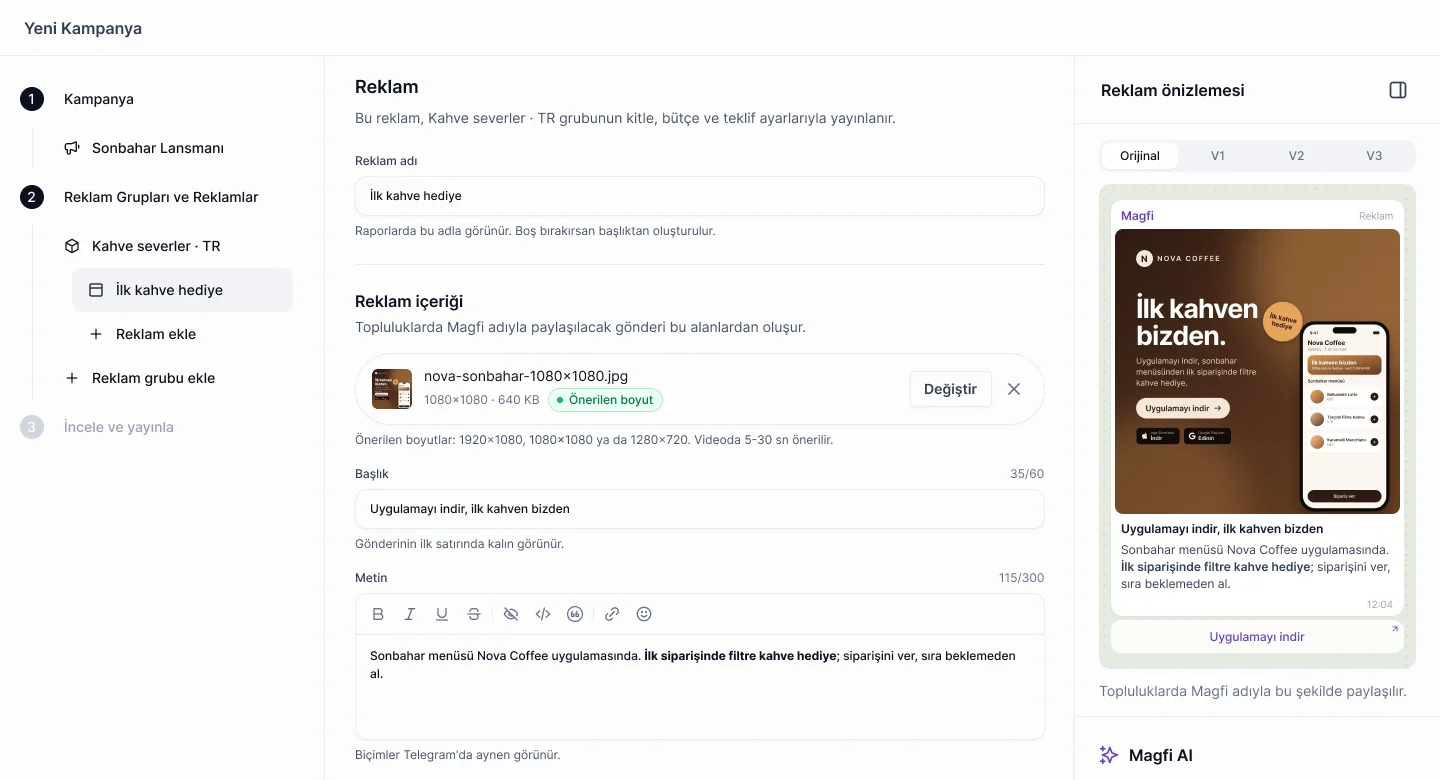
Upload an image or a video, then write a headline of up to 60 characters and a text of up to 300. Formatting such as bold text appears in Telegram exactly as you write it. As you type, the live preview shows your post the way it will appear in communities.
Next, choose a call-to-action button and a destination. For app install campaigns, add your Google Play and App Store links, and Magfi creates one dynamic link that sends each person to the right store. If your app is connected through Adjust, the tracking link is added automatically.
Test more with AI variations
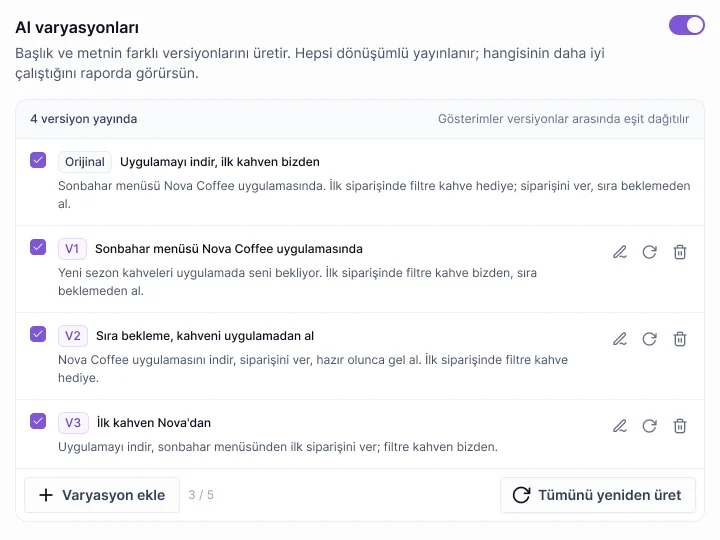
Turn on AI variations and the agent writes alternative versions of your headline and text. You can edit, regenerate or delete each one. All versions run in rotation with impressions split evenly, and your reports show which version works best.
Review and publish
The last step sums everything up: objective, audience, budget, schedule, bid, the ad itself and estimated daily impressions and clicks. Publish when you are ready. New ads go through a review that usually takes a few hours.
Stuck at any point? Ask the Magfi AI panel on the right, for example "Which Max CPM fits this audience?" or "How many days will my budget last?"
Brand safety in every campaign
Brand safety settings live inside every ad group, so they are part of the setup, not an afterthought:
- Frequency cap: limit how often your ad appears in each community, per day or per week. The default is once a day.
- Community exclusions: paste a community link to leave it out.
- Keyword exclusions: skip communities whose names contain a word you choose.
- Brand safety filters: four brand safety filters are switched on by default.
- Audience exclusions: leave out whole topics while you build an audience.
Delivery is verified too. An impression counts only after a minimum view time of two seconds, and clicks are validated with double-click protection. For creative best practices, see our 10 golden rules for branding on Telegram.
Conversions: measure what happens after the click
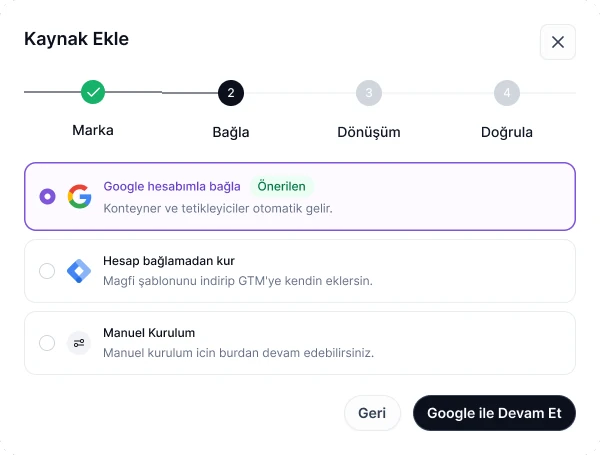
Reach is only half of the story. The new Conversions page brings website, app and Telegram measurement into one setup flow: pick the brand, connect the source, choose the conversion and verify it.
- Website: connect your Google account, and Magfi brings in your Google Tag Manager containers and triggers automatically. You can also install without connecting an account by adding the Magfi template to GTM, or set up the Magfi Pixel manually.
- Mobile app: use your Adjust events, such as installs, as conversions.
- Telegram community: if you promote your own Telegram community, add the Magfi bot and joins that come from your ad clicks are counted automatically with Magfi Signal.
Each source shows whether it is working and when its last event arrived. If a source stops sending data, or a conversion is not used in any campaign, it shows up under Needs attention.
Reports that build themselves
Every campaign now comes with reports out of the box. Magfi creates a setup report when a campaign is created and a daily report for each campaign, generated automatically every day at 09:00.
For anything else, build a custom report. Pick the metrics yourself or describe the report to the AI, for example: "Create a detailed 14-day breakdown of my summer campaign's ads." The agent builds the report with a KPI summary, an ad-by-ad breakdown and a daily CTR trend, then points out the first finding, such as one creative beating another by 22% on CTR.
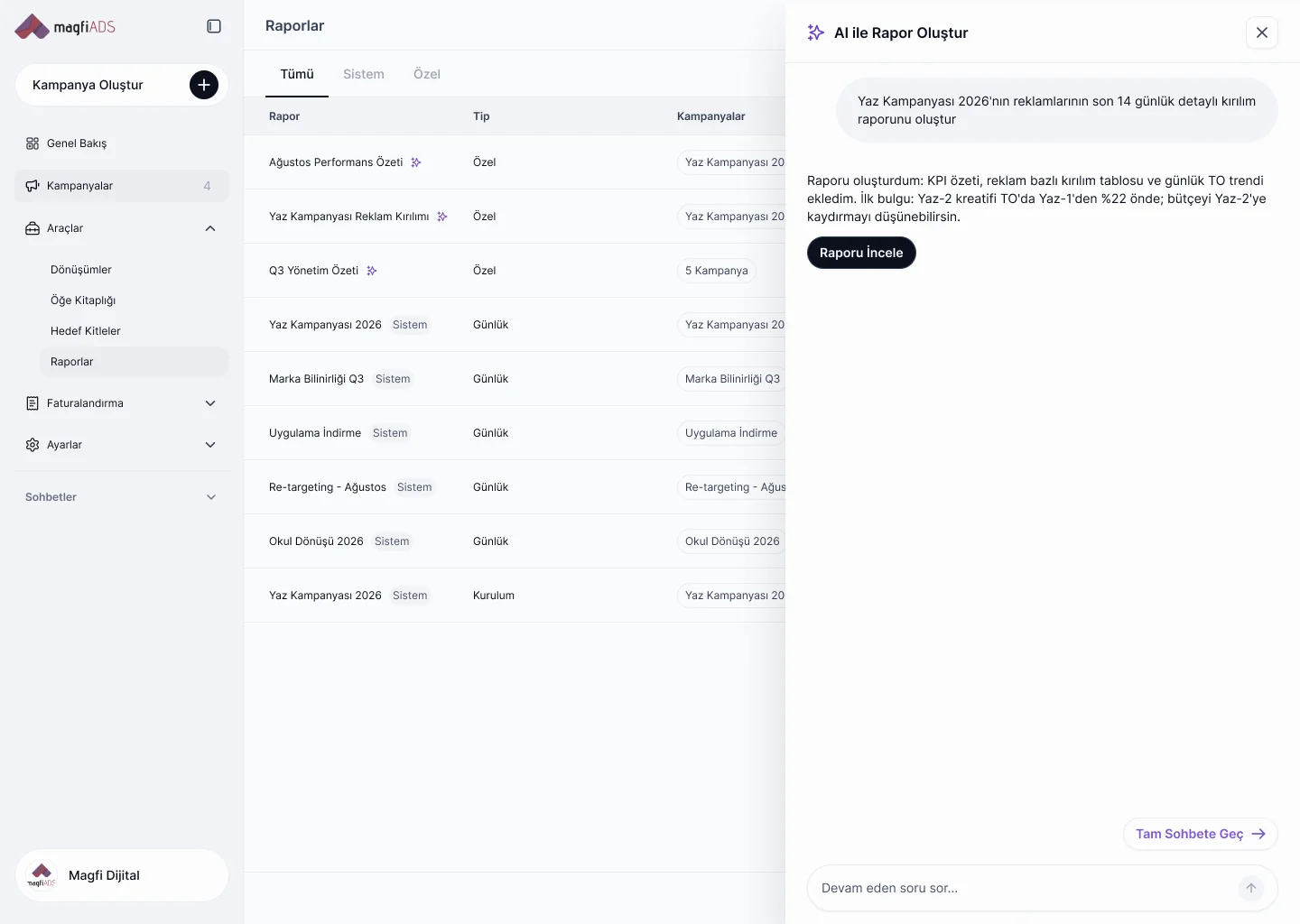
Reports can be shared with a link or exported as CSV, so agencies can send results to clients without screenshots.
Campaigns: one-click control and smarter placements
On the Campaigns page, a single toggle pauses or starts any campaign. Ask for an AI suggestion on any row, and the agent opens a chat about that campaign with its analysis and recommended next steps.
Behind the scenes, a click-prediction model now places each ad in the communities where it is most likely to perform. Same budget, better placements.
Who the new Magfi Ads is for
- Self-serve advertisers: SMBs, apps and e-commerce brands can brief the agent, launch in minutes and start with a small budget.
- Agencies: manage all your brands in one panel, keep brand safety on in every campaign and share reports with clients by link.
- Brand marketing teams: reach people inside the communities they chose to join, with frequency control and brand-safe placements.
How to launch your first campaign on the new Magfi Ads
- Sign up or log in at business.magfiads.com.
- Add your brand: a website, a mobile app or a Telegram or Discord community.
- Create an audience: describe who you want to reach or pick interests.
- Set up the campaign: objective, budget, schedule and Max CPM bid.
- Create your ad: upload your visual, write your text and check the live preview. Turn on AI variations to test more versions.
- Publish and track: after review, follow results on the Overview and in your daily reports.
Prefer to skip the forms? Tell the agent what you want to launch, review its draft and approve it.
Frequently asked questions
What is Magfi Ads?
Magfi Ads is a self-serve ad platform for Telegram and Discord communities. It connects advertisers with 16,000+ communities in 5+ countries that bring in more than 13 million views a day. The new dashboard adds an AI agent that sets up and manages campaigns through chat. For a side-by-side look at the options, see our comparison of the best Telegram ad platforms in 2026.
Does the AI agent change my campaigns without asking?
No. The agent prepares each change as an approval card with the old and new values. Nothing changes until you approve it, and you can undo an applied change.
How much does it cost to advertise on Telegram with Magfi Ads?
You set your own budget, daily or total, and a Max CPM bid: the most you are willing to pay for 1,000 impressions. Before you publish, the campaign builder estimates your daily impressions and clicks. For typical budgets and prices by niche, see our guide on how to advertise on Telegram.
Can I target specific countries and languages?
Yes. Each ad group targets a country and a language, and communities are matched by their main country. You can add more ad groups to cover more markets.
How does Magfi Ads keep ads brand safe?
Every ad group includes frequency caps, community and keyword exclusions, and four brand safety filters that are on by default. New ads are reviewed before they go live, and an impression counts only after a minimum view time of two seconds.
Can I track conversions from Telegram ads?
Yes. Connect your website through Google Tag Manager or the Magfi Pixel, connect your app through Adjust, and count joins to your Telegram community automatically with Magfi Signal.
Is the new dashboard available now?
Yes. The new Magfi Ads is live at business.magfiads.com. Log in with your account or sign up to launch your first campaign.
Start with one sentence
The quickest way to see the new Magfi Ads is to try one request. Log in, open the agent and tell it who you want to reach. It prepares the rest and waits for your approval.